

















































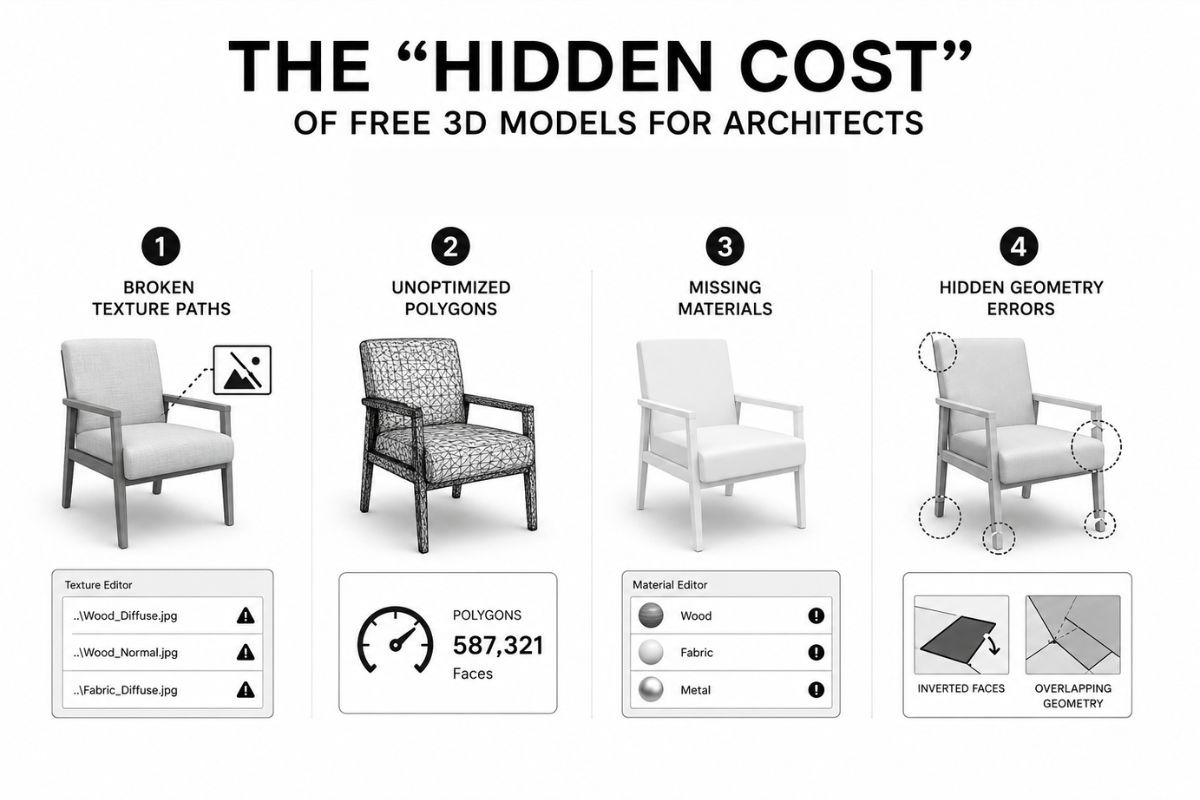
Free 3D models for SketchUp are available from dozens of online sources, but most of them ship with technical problems that require manual repair before rendering. Broken texture paths, unoptimized polygon meshes, and missing material assignments are common issues across community-contributed libraries. For architects and interior designers working under project deadlines, that repair work can take 30 to 90 minutes per model, directly eating into billable time.
Render-ready models solve this by arriving with clean geometry, correctly assigned materials, and pre-configured settings for specific rendering engines. Designers can go from download to render without a cleanup step in between. The time savings compound fast when a single interior scene requires 20 to 40 individual models.


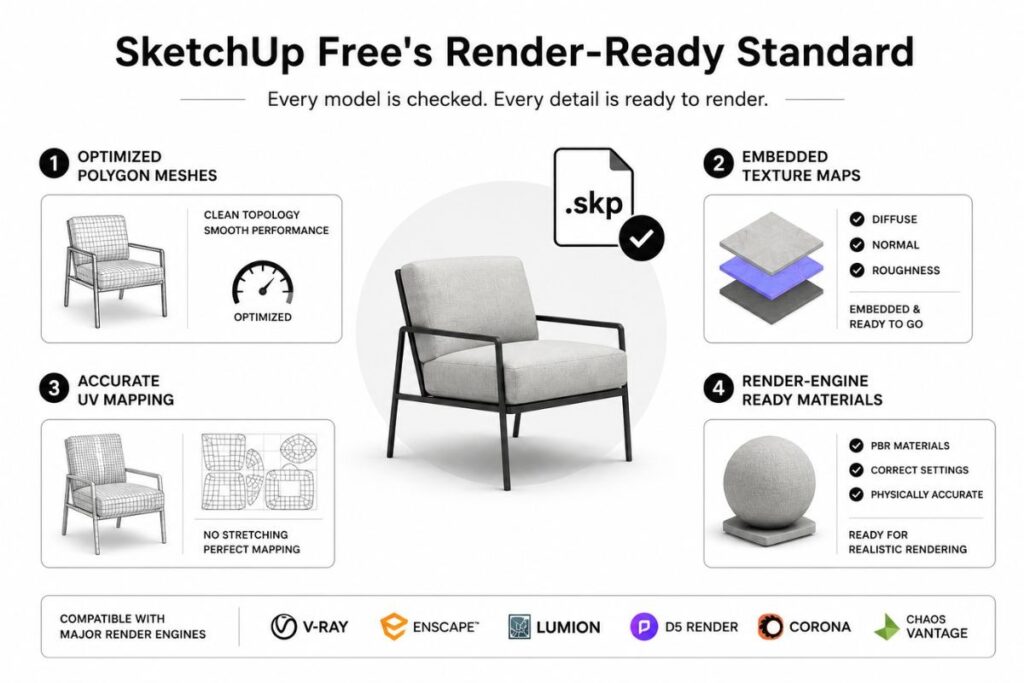
SketchUp Free, a platform operated by SketchUp Free Ltd in Los Angeles, has built a free library around this render-ready standard. According to the team, all .skp models and PBR textures in the collection are checked for compatibility with V-Ray, Enscape, Lumion, D5 Render, Corona, and Chaos Vantage before publication. The library covers furniture, architecture, interior scenes, lighting, decoration, and building materials.
This article breaks down the real costs behind free 3D models, how the render-ready approach addresses them, and the practical time savings architects and interior designers can expect when switching to pre-configured assets.
The “Hidden Cost” of Free 3D Models for Architects
Free 3D models carry costs that don’t show up in the download price. Files from community-contributed platforms can vary significantly in quality. While some models import cleanly, others arrive with technical problems that require manual repair before they can be used in a professional rendering scene.
The most common issues include:
- Broken texture paths that disconnect image files from model surfaces, forcing designers to manually relink every material.
- Unoptimized polygon counts exceeding 500,000 faces for a single furniture piece, causing viewport lag and rendering crashes.
- Missing material assignments that leave surfaces blank, requiring full manual setup in the rendering engine before the first test render.
- Hidden geometry errors such as inverted faces and concealed edges that are invisible in the viewport but still calculated by the renderer, inflating render times and producing visual artifacts.
For a working designer, the repair sequence is a familiar hurdle. A single furniture model with eight material zones can consume 30 to 90 minutes of correction work. This includes manually relinking missing image files, reassigning render engine materials, and troubleshooting test renders. Multiplying that time cost across a full interior scene with 20 or more objects turns “free” into an expensive proposition measured in lost billable hours rather than software subscription fees.
“We kept hearing the same thing from designers: the download was never the end of the job,” said a representative of SketchUp Free Ltd. “We built the library around one rule, files should render quickly out of the box, not after an hour of cleanup.”
SketchUp Free’s Render-Ready Standard
The SketchUp Free library applies four conditions to every .skp file before publication: optimized polygon meshes, embedded texture maps, accurate UV mapping, and render-engine-specific material assignments. According to the team, files that don’t meet these conditions are not published. The practical result is that designers can skip the cleanup phase and go directly from download to rendering.
The library covers nine architectural categories. Furniture and fully staged interior scenes are the most downloaded sections, followed by architecture and exteriors, lighting and decoration, kitchen and bath fixtures, and landscape elements. The collection also includes free SketchUp textures at SketchUp Free, covering wood, stone, marble, concrete, tile, brick, fabric, metal, and glass. All textures ship with PBR map layers (Diffuse, Normal, Roughness) for accurate surface behavior in rendering environments.
These assets are pre-configured for six major rendering engines, split between offline ray-tracing renderers (V-Ray, Corona) and real-time visualization engines (Enscape, D5 Render, Lumion, and Chaos Vantage). Compatibility tags, such as “V-Ray Ready” or “Enscape Ready,” indicate that lighting and materials are optimized specifically for that software’s parameter math.
How Free Render-Ready Models Help Architects and Interior Designers Save Project Time
With the cleanup phase removed, the time saved on a single project adds up quickly. But time is only part of the benefit. Render-ready models change three things about how architects and interior designers work with free 3D resources.
Faster client iterations. When models render correctly on the first import, designers can produce multiple visualization options for client review in a single work session. A revision that previously required downloading a new model, spending 30 to 60 minutes on cleanup, and re-rendering can now happen in minutes. For firms billing by the hour, faster iterations mean more deliverables within the same budget.
Lower barrier for independent designers. Freelancers and small studios typically can’t afford premium model subscriptions ($200 to $500 per year on top of $349 for SketchUp Pro and $350 for V-Ray). Free render-ready models eliminate one cost layer entirely while also removing the unpaid repair hours that make “free” models expensive in practice.
Consistent quality across a full scene. Interior scenes require 20 to 40 individual models working together. When models come from different sources with different material standards, designers spend time matching textures and adjusting lighting to achieve visual consistency. A curated library with a single quality standard yields more consistent scenes with fewer manual adjustments.
All models on the SketchUp Free platform are distributed under a royalty-free license for commercial use, compatible with SketchUp 2020 and later, and available for download without account registration.
Licensing Terms: Free for Commercial Use
To provide high-quality, render-ready models without paywalls or mandatory registration, SketchUp Free relies on a sustainable revenue model. The platform funds its infrastructure through affiliate partnerships with render engine developers, such as Chaos, Lumion, and D5 Render, alongside display advertising. The platform operates independently and is not affiliated with Trimble Inc.
Thanks to this model, all assets are distributed under a royalty-free license permitting unlimited commercial use. This includes paid client renders and marketing imagery, and no attribution is required. However, redistributing the raw .skp source files or using them in AI training datasets is strictly prohibited.
Designers must also be mindful of intellectual property. Many models replicate real-world furniture that is protected by trade dress rights held by the original manufacturers. While the legal risk is minimal for private client renderings or portfolios, using these recognizable designs in prominent national advertising campaigns may require separate trademark clearance. Finally, always verify software compatibility for SketchUp 2020 or newer and ensure your rendering engine matches the asset’s specific readiness tag for optimal results.