

















































For the better part of a decade, Dynamics 365 Business Central was a reliable system for growing businesses. You set it up, your team used it, and when Microsoft released updates, your IT team or partner reviewed the changes, fixed anything that broke, and carried on. The update cycle was manageable because the updates were, broadly speaking, incremental.
Wave 1 2026 changed the character of that update cycle. Microsoft did not just add features, it added autonomous AI agents that now operate inside Business Central, executing workflows without waiting for a human to trigger them. The Payables Agent processes invoices. The Sales Order Agent creates orders. The Agent Designer lets your team build custom agents for any BC workflow you choose.


These are genuinely useful capabilities. They are also the source of a testing gap that most BC teams have not yet closed, and that Wave 2, arriving in October, will widen further.
What the Agents Actually Do, and Why It Changes the Testing Problem
To understand the testing challenge, it helps to be specific about what Wave 1 2026 put into Business Central.
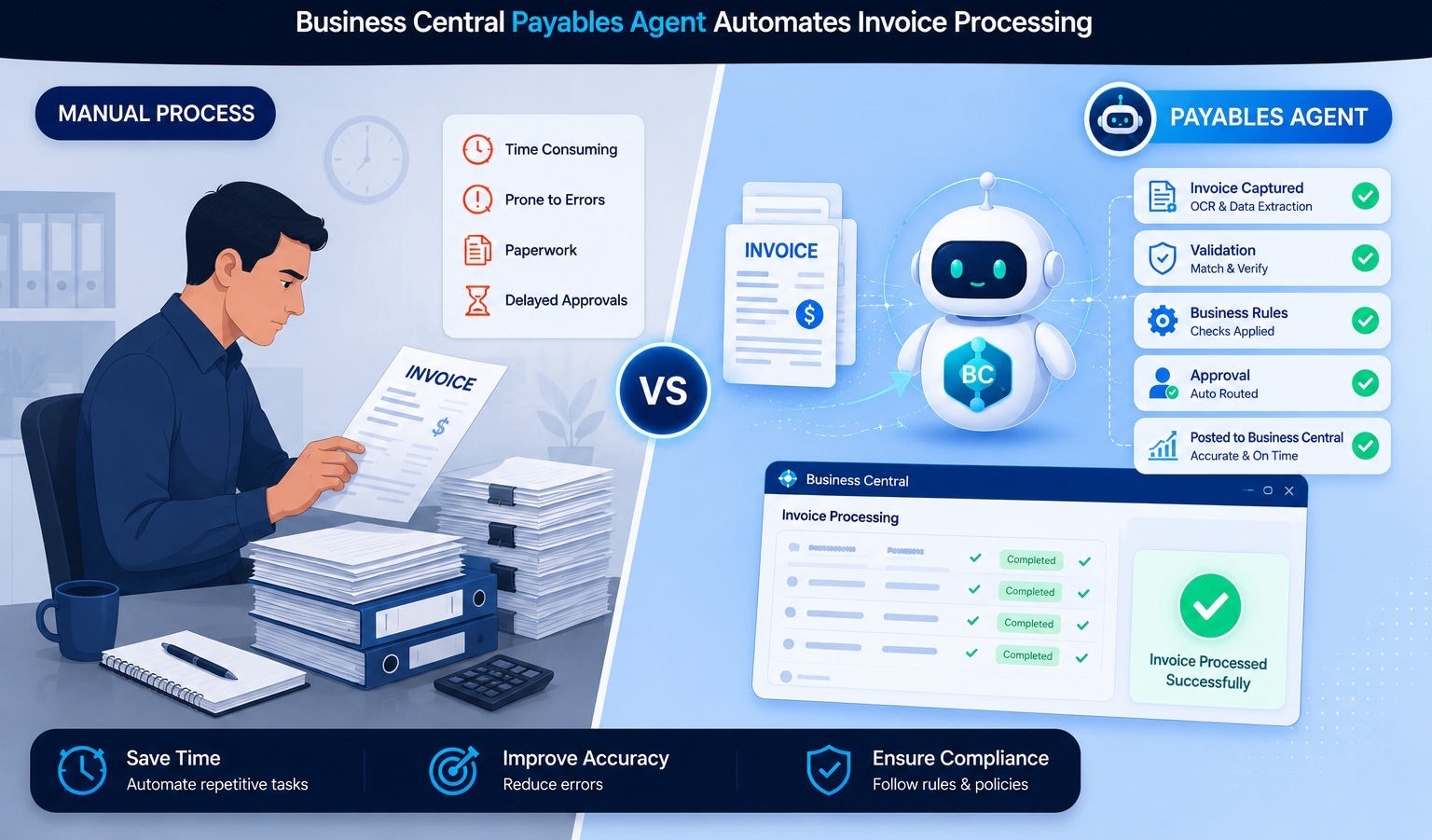
The Payables Agent reads incoming vendor invoices, matches them to purchase orders in BC, assigns GL account codes, checks payment terms, and routes invoices for approval, all without human interaction at the matching stage. The Sales Order Agent can receive an instruction in natural language, from an email, from a chat message, from a Copilot prompt, and create or update a sales order in BC accordingly. The Agent Designer gives organizations the tools to extend this further with custom agent logic for any internal process.
This is not a Chabot that suggests next steps. It is software that writes to your financial system.
The testing question that follows is straightforward but consequential: when an agent assigns a GL code to an invoice, how do you know it assigned the right one? When it creates a sales order, how do you verify the pricing rules were applied correctly? When a custom agent posts a transaction, how do you confirm the financial outcome is what your chart of accounts requires?
| “Traditional BC testing asks: did the screen respond correctly? Agent testing asks: did the software make the right financial decision? The first question is easy to answer. The second requires a different approach entirely.” |
Why Record-and-Replay Won’t Work Here
Most BC teams that have any automated testing at all are using some form of record-and-replay tool, either the AL Test Framework that ships with Business Central (designed for unit testing AL code, not end-to-end business process validation) or a third-party recorder that captures screen interactions and replays them.
These approaches have always had a built-in limitation: they record what a human does on screen, and they break when the screen changes. Every BC Wave release changes screens. The approach is brittle by design for an environment that updates twice a year.
But for AI agent workflows, the limitation is more fundamental than brittleness. The Payables Agent does not interact with the BC interface the way a human does. There are no screen interactions to record. The agent reads invoice data, queries vendor master records, applies GL coding logic, and writes to the AP ledger, entirely in the data layer. A recording tool looking at the screen cannot see any of this. It can confirm that a success notification appeared. It cannot tell you whether the transaction is financially correct.
This is the gap. Agents act on data. Testing tools built for screens cannot validate what agents do in data.
What Testing BC’s AI Agents Actually Requires
Validating AI agent workflows in Business Central requires outcome validation, checking what the agent wrote to the financial system, not what appeared on screen. For the Payables Agent, that means asserting:
- The invoice was matched to the correct purchase order line
- The GL account assigned matches the correct code for this vendor and item category
- The financial dimensions carried through correctly from the purchase order
- The payment terms applied match the vendor master configuration
- The transaction landed in the correct open accounting period
None of these validations are possible by reading the BC interface. All require access to the underlying ledger records, which is exactly what AI test agents designed for Business Central are built to provide.
Sofy’s dedicated Dynamics 365 test agents include a purpose-built Business Central agent that validates these outcomes at the data layer, across the Payables Agent, the Sales Order Agent, and any custom agents built with the Agent Designer. The complete BC testing guide covers the full testing framework for Wave 1 2026 and Wave 2 preparation in detail.
The Window Before Wave 2 Closes
Wave 2 2026 arrives in October. Microsoft has signaled it will deepen the agentic capabilities introduced in Wave 1, expanding what the existing agents can do and maturing the Agent Designer framework. Every team that has deployed Wave 1 agents without automated outcome validation will have a larger untested surface area when Wave 2 lands.
The preparation window is now. Building automated BC test coverage across the Payables Agent, Sales Order Agent, and any custom agents takes significantly less time in June, with four months of runway, than it does in September, with the Wave 2 preview already active.
The shift from record-and-replay to outcome validation is not a large project. It is a change in what the test asserts. Instead of “did the screen show a confirmation message,” the test asks “is the GL entry correct.” That change in question is what closes the testing gap that Wave 1 2026 opened.
For teams starting this process, Sofy.ai offers a no-code approach to D365 Business Central test automation, no AL scripting, no developer dependency, no rebuilding after every wave. The starting point is validating the three BC AI agent workflows that carry the highest financial risk: AP invoice coding, sales order pricing, and period-end posting accuracy.