


















































A baby monitor answers an immediate question: what is happening in the nursery now? Exterior cameras answer a wider one: who is approaching the home? One monitoring plan can reduce blind spots without confusing childcare with perimeter security.
For the perimeter, outdoor monitoring cameras cover entrances, gardens, garages, and driveways. They need weather resistance, controlled viewing angles, and secure storage. Nursery equipment needs clear night viewing, dependable audio, simple controls, and safe placement away from the cot.


The connection is a set of zones, each with its purpose, alert type, access rules, and retention period. This guide shows how to plan those zones without turning the home into constant surveillance.
Give Every Camera a Defined Job
A baby monitor should help a parent check sleep, hear a cry, or speak through two-way audio. It does not replace direct supervision or safer-sleep practice. The NHS states that a baby’s safest sleeping place for the first six months is a cot in the same room as a caregiver.
Around the boundary, outdoor monitoring cameras should protect specific approaches rather than record the largest possible area. A driveway camera may prioritise vehicles, while a door camera needs faces and deliveries. Clear purpose guides position, detection zones, recording length, and viewer access.
Build the Monitoring Layers
A whole-home plan works when the nursery, interior route, entrance, and boundary have different rules. Start with the areas that carry the greatest consequence, then add coverage only where it answers a real question. More cameras can create more alerts without creating better decisions.
Nursery Video and Audio
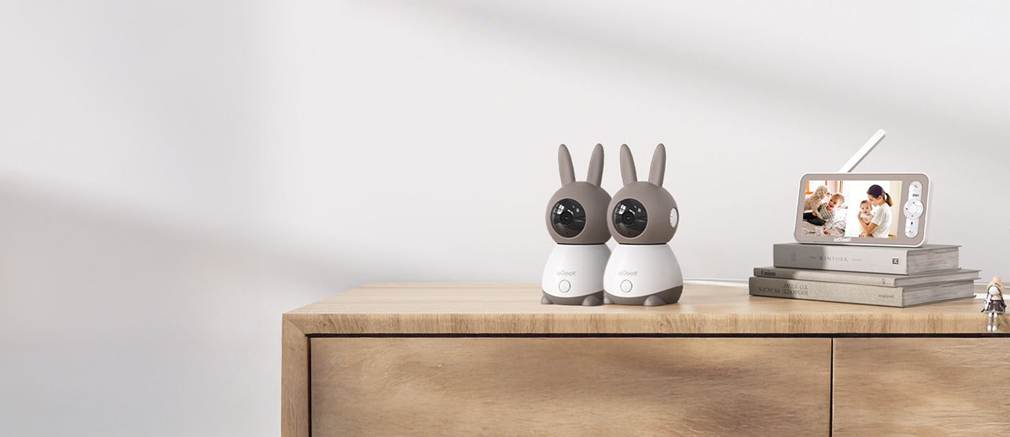
An ieGeek baby monitor may provide 2K video, remote pan and tilt, automatic night vision, cry or noise alerts, two-way audio, and either WiFi or FHSS connectivity depending on the model. Select the connection method around range, remote access, and privacy needs.
Routes Through the Home
An indoor camera can cover a hallway or play area when the household needs wider supervision, but it should not be treated as an automatic extension of nursery monitoring. Give each viewer the minimum access required, review notifications, and avoid placing cameras in areas where household members expect privacy.
Entrances and Deliveries
Entrance coverage should capture an approaching person before they reach the door, while avoiding unnecessary views of neighbours. Positioning matters more than a maximum field-of-view claim. Smart person detection may reduce alerts from branches or pets, although detection performance can vary with light and angle.
Gardens, Garages, and Gates
For gardens and gates, outdoor monitoring cameras can use solar, battery, plug-in, WiFi, or 4G connections. The ieGeek outdoor range includes 2K and 5MP devices, night vision, app alerts, and pan-and-tilt options. Choose power and network type after checking shade, weather, and signal.
Match Alerts to Real Decisions
The table separates events that require immediate attention from events that can wait for review. It is a planning tool, not a promise that detection will identify every event. Sensitivity, lighting, obstruction, network delay, and camera angle all affect alert quality.
| Zone | Useful Alert | Likely Response | Avoid |
| Nursery | Cry, sound, or movement | Check the live view, then attend if needed | Treating an alert as medical advice |
| Front door | Person or doorbell event | Review visitor or delivery | Recording more pavement than necessary |
| Driveway | Person or vehicle movement | Check an unexpected arrival | Maximum sensitivity near a busy road |
| Garden gate | Entry into a defined zone | Confirm access or investigate | Pointing directly into neighbouring space |
High-Priority Events
Nursery sound, a person at the door, or movement inside a restricted gate may justify an immediate alert. Keep these notifications specific. If every shadow and passing car produces the same tone, users may silence the system and miss the event the setup was intended to flag.
Review-Later Events
Routine deliveries, known vehicles, and low-risk garden movement often suit a daily review rather than an interruption. Local storage can reduce reliance on cloud subscriptions, but retention should remain purposeful. Store enough history to investigate an incident without keeping identifiable footage indefinitely.
Install With Safety and Privacy in Mind
Installation should protect the people being monitored. Nursery devices need stable mounting and cables kept away from the cot. Exterior cameras need a controlled field of view. Both systems need strong credentials, current firmware, and access limited to household members who genuinely require it.
- Mark the exact nursery, entrance, driveway, and boundary zones on a simple floor plan.
- Test daytime video, night video, audio, and notifications before final mounting.
- Review passwords, user access, privacy masks, and retention settings after installation.
Keep Outdoor Capture Proportionate
The ICO advises owners to point home CCTV away from neighbouring property, public areas, or communal space where possible. Configure outdoor monitoring cameras around the property boundary, apply privacy blockers when available, and use signage when data protection rules apply to the captured area.
Mistakes That Weaken the System
Most weak monitoring plans fail because all cameras are treated alike. Nursery care, household supervision, and perimeter security have different consequences. A system becomes easier to trust when every device has a limited purpose, an appropriate alert threshold, and an owner responsible for reviewing access.
Using a Monitor as a Safety Guarantee
A baby monitor provides information; it does not prevent sleep-related risk. Follow NHS safer-sleep guidance on cot position, a firm flat mattress, clear sleep space, and room sharing. Use video and audio to support observation, not to replace physical checks or professional medical advice.
Sharing Too Many Accounts
Shared passwords weaken accountability and make removal difficult. Create separate accounts where the platform supports them, enable stronger authentication, and remove access when it is no longer needed. The National Cyber Security Centre also recommends changing default passwords and keeping camera firmware updated.
Letting Alerts Compete
A baby monitor alert should not be buried beneath repeated driveway notifications. Use different tones, schedules, or priority levels if the platform allows. Reduce exterior sensitivity before disabling nursery alerts, and check whether smart detection zones can exclude roads, trees, or other predictable movement.
Skipping a Night-Time Walk-Through
Infrared reflection from glass, walls, or nearby objects can wash out a night image. Exterior lights may create deep shadows, while a nursery camera may lose the cot behind furniture. Review every important angle after dark and repeat the test when seasonal lighting changes.
Keep the Plan Simple
A whole-home monitoring system should answer a few important questions quickly. Keep nursery observation, indoor access, and exterior security separate in the settings, even when one app displays them together. Clear roles produce clearer alerts and safer access decisions.
Review the setup every few months and whenever routines change. Move or retire cameras that no longer serve a defined purpose, confirm who still has access, and check that stored footage, notification rules, and privacy zones still match the household’s needs.