




















































Video used to be one of the most expensive formats in any content workflow. A single campaign could require scripting, filming, editing, voiceover, and several days of turnaround before anything was ready to publish. For many teams, that made video a limited asset rather than an always-on content format.
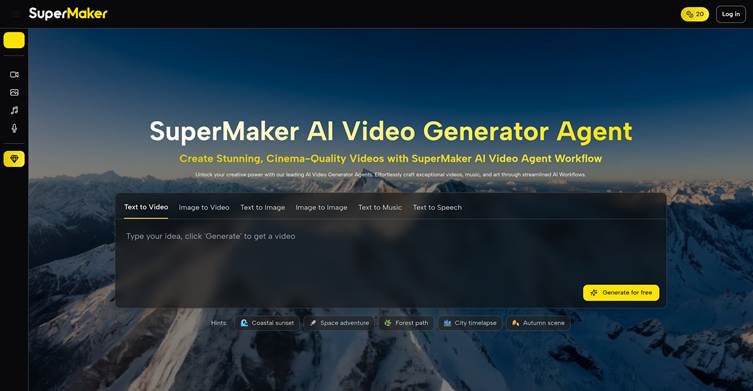
SuperMaker was built to remove that friction. Its AI Video Maker turns a text prompt or a set of reference images into a finished clip in minutes, and official materials emphasize that users can start without logging in first. For marketers, educators, and independent creators who need fast output without a full production team, that makes SuperMaker more practical than many single-purpose AI video tools.

What Is SuperMaker’s AI Video Maker?
SuperMaker is an all-in-one AI creative platform centered on video generation. It allows users to turn text prompts or static images into videos while also supporting voice, music, and image generation inside the same broader ecosystem. Instead of handling visuals in one tool and audio in another, users can move from concept to generated scenes and then into refinement within one workflow.
This matters because most AI video workflows still feel fragmented. SuperMaker positions itself as a browser-based production layer where generation and lightweight editing happen together, making it better suited to repeated commercial content production rather than one-off experiments.
The Other Key Features of SuperMaker AI
- Integrated Support for Multiple Video Models
SuperMaker does not depend on a single model. Instead, it aggregates several major video backbones—such as Veo, Sora, Kling, Wan, and Seedance—to cover different styles and use cases. Reviews and official descriptions also note compatibility with newer models like Google Veo 3, aimed at higher‑quality, cinematic footage and more complex camera work.
This multi‑model setup offers clear benefits:
- Marketing shorts can lean on models tuned for social‑style content.
- Brand films and narrative videos can use more cinematic models.
- Users do not need to learn each model’s API or parameters; SuperMaker wraps everything in a unified frontend, exposing only the controls that matter for day‑to‑day production.
- Built-In Audio: Voice, Music, and Sound Effects
SuperMaker focuses not only on visuals but also on the entire audio layer. It offers text‑to‑speech voice generation with multiple languages and tones, which is ideal for explainers and ad voiceovers. It can also generate background music that matches different scene styles—such as light, cinematic, or electronic—and supports basic sound effects for transitions, UI clicks, and other interaction cues.
The result is that a single script can yield “broadcast‑ready” video plus audio within one workflow, eliminating the need to hunt for separate voiceover services or music libraries and reducing manual assembly in post‑production.
- Storyboard and Timeline Editing Tools
Unlike generators that only output a single flat clip, SuperMaker includes scene‑level editing tools in the browser. Users can reorder or delete generated scenes, adjust shot duration and transition timing, and tweak prompts for specific segments to regenerate just that part.tapscape+1
This makes SuperMaker feel like a lightweight editing tool powered by AI, rather than a one‑shot black box. It gives teams enough control to align videos with brand guidelines and client feedback without leaving the platform.
- One-Stop Multimedia Creation
Documentation and app‑store descriptions consistently present SuperMaker as a central hub for video, images, music, and voice.
- Image: The AI Image Maker supports models like GPT Image 1.5, Nano Banana Pro, Flux and others to turn text into high‑resolution visuals and to edit existing photos. Teams can generate thumbnails, covers, logos, and product mockups, then drop those assets directly into video projects for more consistent branding.s
- Music: The AI Music Maker converts text descriptions or lyrics into royalty‑free tracks in multiple genres and moods. Marketers can quickly create custom soundtracks that match each video’s tone without dealing with traditional licensing.
- Voice: The AI Voice Maker turns scripts into natural, expressive speech, with multiple tones and languages suitable for narration, ads, and storytelling. Voiceovers generated here can be layered onto SuperMaker videos or used in standalone audio content.
For operations and content teams, this means a single platform can handle the full chain from cover image and BGM to voiceover and final video, simplifying coordination across tools.
Why SuperMaker Stands Out from Other AI Video Tools
Many AI video tools are good at one stage of the process but still force users into fragmented workflows. Some specialize in generating footage, others in editing, and others in templates. SuperMaker stands out because it combines multi-model generation, built-in audio, storyboard editing, and low-friction access inside one environment.tapscape+2
| Tool / Aspect | Input Types | Video Models | Audio Layer | Editing & Storyboard | Access & Trial | Best Fit |
| SuperMaker | Text prompts, scripts, images | Multiple models, multi-style | Built-in voice + music + SFX | Storyboard + timeline editing | No-login trial, web + app | Frequent commercial video content |
| Pika Labs | Text and image prompts | Single stylized model | Limited built-in audio | Prompt-led, light controls | Account required | Creative, stylized short clips |
| Runway | Text, image, video inputs | Strong in-house models | Some audio, external tools | Advanced editing workspace | Registration, tiered plans | Professional, studio-style projects |
| Canva / CapCut | Templates + uploaded media + text | Template-focused, some AI | Built-in music and simple voice | Drag-and-drop timeline | Freemium account model | Everyday branded & template content |
What makes SuperMaker different is not just that it can generate video. It is that the platform is designed to output something much closer to a finished, usable marketing asset in one session, rather than handing users one raw clip and leaving the rest to other software.
How to Use SuperMaker’s AI Video Maker
Step 1 — Start with a Prompt or Image
Begin by describing the video you want to make. You can type a short prompt, paste a script, or upload reference images such as product shots, campaign visuals, or concept art to guide the result.
Step 2 — Generate the First Draft
Once your input is ready, SuperMaker generates a structured sequence of scenes with motion, framing, and pacing based on the selected model and style. This gives you a quick first draft directly in the browser, which is useful for fast creative validation.
Step 3 — Add Voice, Music, and Effects
Use the built-in tools to add AI voiceover, background music, and sound effects inside the same project. Because audio and visuals are created together, it is easier to keep narration, transitions, and mood aligned without moving to separate platforms.play.
Step 4 — Edit, Refine, and Export
Open the storyboard or timeline view to reorder scenes, adjust durations, and regenerate selected clips instead of redoing the whole video. When the pacing and structure are right, export the final file for ads, social posts, tutorials, or internal communications.
Top Use Cases for SuperMaker AI Video Maker
- Marketing and Advertising
Teams generate high-volume ad creatives, product videos, and social media content without relying on production teams. This enables faster testing and iteration across campaigns.
- Education and Training
Educators create explainer videos, tutorials, and lesson visuals without needing design or editing expertise.
- Content Creation and Social Media
Independent creators produce daily or short-form video content efficiently, maintaining consistency without heavy editing workflows.
- Business and Product Communication
Startups and small businesses create demos, onboarding videos, and promotional content without investing in traditional video production.
Final Thoughts
AI video generation is no longer experimental — it is becoming a core part of modern content workflows. While it will not replace high-end production, it dramatically reduces the cost and time required for everyday video content.
SuperMaker stands out by combining generation, editing, and audio into a single streamlined experience. With no login required to start, it offers a low-friction way to test, create, and scale video production — making it a practical tool for teams that need speed without sacrificing output quality.