





















































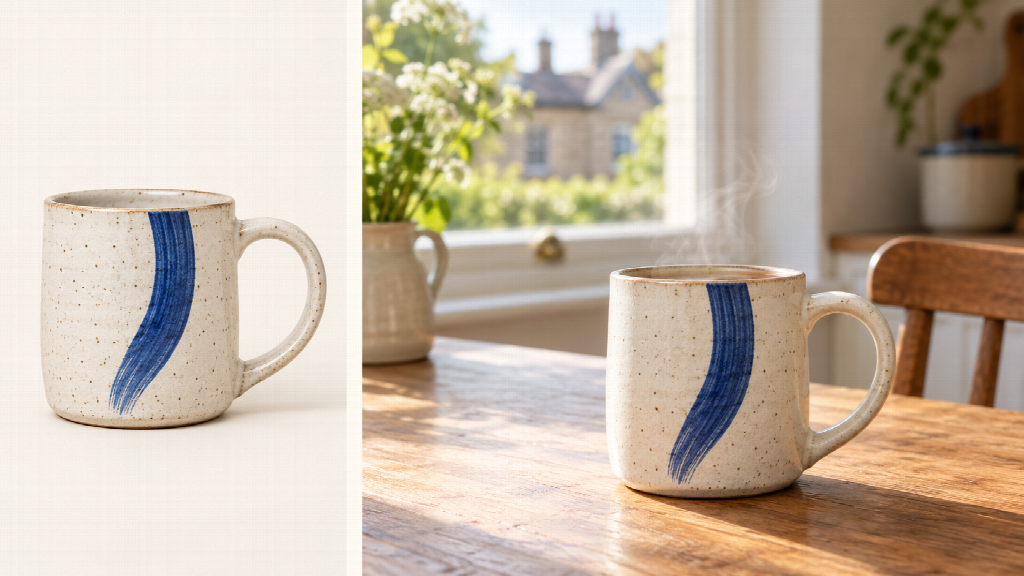
AI-generated illustration: product photograph to breakfast-scene video concept.
A small shop can have a photograph good enough for its online product page and still have nothing moving to post on social media. A new shoot means finding a suitable space, arranging the light and making time around orders and customers. Image-to-video AI gives the owner another way to build a short product story from a photograph already in the catalogue.


Take a hypothetical independent ceramics shop in Bristol. Its owner has one clear photograph of a handmade mug: warm ivory glaze, fine speckles, a cobalt-blue brushstroke and a handle visible on the right. The shop wants an Instagram Reel showing the mug on a breakfast table, with morning light moving across the pottery and a little steam rising above it.
That is a useful brief for Seedance 2.5 AI. The photograph establishes the product, while a written prompt directs the surroundings, movement and sound. The owner can organise an afternoon around selecting the image, building a short scene and trying a second mood for the same mug.
Start with a photograph that can carry the story
Choose a photograph in which the mug fills enough of the frame to show its shape, glaze and blue decoration clearly. A plain background makes those details easy to read. Leave some space above the rim and around the handle so the composition has room for steam, light and a gentle camera move.
Open the Seedance 2.5 AI video generator, select Seedance 2.5 and upload the photograph through the image-to-video option. Describe the mug as the main subject and explain the breakfast setting you want to create around it. The image gives the model a visual reference; the prompt turns that reference into a directed scene.
For a vertical Reel, prepare a portrait crop of the same photograph before uploading. The image-to-video route follows the starting frame’s aspect ratio, so this preparation sets the shape of the finished clip. Keep the whole handle visible and position the mug slightly below the centre. That leaves the upper part of the picture available for the rising steam and the soft window background.
Give a 15-second video four clear moments
Decide what the viewer should notice first. Here, the blue brushstroke is the recognisable detail, and the breakfast table makes the mug feel useful in everyday life. A slow approach towards the glaze will serve that idea well. Keep the camera on the photographed face of the mug so the decoration stays prominent throughout the sequence.
Seedance 2.5 supports connected shot changes within a single generation of up to 30 seconds. This particular social post only needs 15 seconds, leaving space for an opening product view, a wider glimpse of the setting, a detail shot and a settled final frame. Give each part a purpose in the prompt.
| Timing | Picture and movement | Purpose |
| 0–3 seconds | Open close to the mug as daylight falls across the speckled glaze. | Make the product immediately recognisable. |
| 3–7 seconds | Gently widen to reveal the wooden breakfast table and softly lit window. | Place the mug in an inviting everyday setting. |
| 7–11 seconds | Slowly approach the blue brushstroke and the curve of the handle. | Highlight the handmade detail. |
| 11–15 seconds | Settle on a steady product view with delicate steam above the rim. | Give the viewer a clear final image. |
These timings give the model a sequence to follow. The wider moment introduces the setting, while the closer moment brings attention back to the pottery. That rhythm also suits a person scrolling through a feed: the mug appears at once, and the scene develops around an object they already recognise.
Tell Seedance 2.5 what should move
A useful prompt names the fixed details before describing the action. For this mug, those details are the ivory glaze, fine speckles, cobalt-blue mark and right-hand handle. The moving elements are daylight, steam and the camera. Write them separately so the direction is easy to follow.
Seedance 2.5 combines visual reference with written scene direction and audio-video generation. A retailer can therefore describe the whole moment in one creative brief: how the mug looks, where it sits, how the camera approaches and what the room sounds like. A gentle ceramic clink and quiet kitchen ambience fit this breakfast scene.
A prompt for the ceramics shop
Use the uploaded product photograph as the main visual reference. Keep the mug’s warm ivory speckled glaze, cobalt-blue brushstroke, rounded shape and right-hand handle consistent. Create a 15-second vertical social video in a softly lit British kitchen. At 0–3 seconds, show the mug clearly on a wooden table as morning light falls across the glaze. At 3–7 seconds, gently widen to reveal the breakfast setting and soft window light. At 7–11 seconds, slowly approach the blue decoration and handle. At 11–15 seconds, settle on a steady product view with delicate steam rising above the rim. Keep the blue brushstroke facing the viewer. Add quiet kitchen ambience and one soft ceramic clink, with no dialogue. Use a warm, natural colour palette and an uncluttered background.
The prompt’s camera instructions are deliberately specific. “Make it cinematic” gives very little direction about a particular product. “Slowly approach the blue decoration” tells the model which detail deserves attention and connects the camera movement to the shop’s selling point.
Set the duration to match the brief and enable audio for the version with kitchen ambience. Treat sound as part of the scene: the clink gives the mug a tactile quality, while the room tone supports the quiet morning setting. The same composition remains easy to understand when a viewer watches with the sound off.
Try a second mood with the same product photo
Once the breakfast direction is established, keep the mug description and camera plan together as a reusable brief. Change the surroundings to make another version for a different post. This is where a single catalogue photograph becomes particularly useful: it can anchor several visual settings while the shop directs the atmosphere through text.
For a rainy weekend version, describe fine rain on the kitchen window, a grey morning outside and a warmer pool of light around the ivory glaze. Ask for almost still framing, with the steam providing most of the visible movement. Pair that clip with a caption about a slow Saturday breakfast or the shop’s latest mug collection.
A brighter version could place the same mug on a clean display shelf in daylight. Keep the blue decoration facing the camera and ask for a gradual approach towards it. This direction suits a gift-focused post, where the pottery itself occupies the frame and the caption explains the available colours or collection date.
Choose the background according to the post’s purpose. Breakfast makes the mug feel part of a daily routine; the display shelf puts its design forward. Save each prompt under a descriptive name, such as “morning table” or “daylight display”, so it is easy to return to the right creative direction for the next post.
Refine a specific moment with an AI edit
Seedance 2.5 also supports edits directed at particular timestamps. This gives the shop a way to refine a chosen scene with an instruction aimed at a defined part of the clip. If the owner wants a closer final view, the revision can focus on the last four seconds while retaining the established product and setting.
Attach the generated clip and choose Edit. A useful instruction would be: “At 11–15 seconds, bring the camera slightly closer to the mug, keep the blue brushstroke centred, and finish with gentle steam above the rim. Preserve the earlier breakfast-table sequence.” The request describes a visual change and identifies exactly where it belongs.
The video-input controls distinguish Edit from Reference and Extend. Edit reworks the attached clip; Reference uses it to guide a new clip; Extend continues from its ending. For this afternoon’s Reel, Edit is the relevant choice when refining the closing shot. A quick review of the mug’s appearance, sound and final frame completes the selection.
Put the finished scene to work
Begin the afternoon with the image and one clear message: this handmade mug belongs on a breakfast table. Prepare the portrait crop, write the four-part scene and generate the morning version. Then use the same product description to explore the rainy-window alternative. This keeps the session focused on two scenes with a clear use for the shop.
Pair the chosen clip with a practical caption. Mention the mug’s design, the collection it belongs to and how customers can order it. For a local Bristol audience, the caption could include the shop’s opening hours or collection arrangements. The video supplies the atmosphere; the caption supplies the information a customer needs to act.
For the next post, reopen the saved prompt and change the scene direction: brighter afternoon light, a closer view of the brushstroke or a quieter final moment. Seedance 2.5 AI lets the shop build those new product stories around the photograph it already has, giving the same catalogue image a fresh role in its social feed.