





















































That half-finished sales deck isn’t unusual. It’s normal. You’ve got 15 mismatched slides and a ticking deadline, so you need a tool that fixes what’s there instead of forcing you to start from scratch. Around 30 percent of UK businesses were already using at least one AI product by September 2026, more than triple the 2023 share, according to the Office for National Statistics (ONS). Plus AI, Gamma, Beautiful.ai, and Canva all promise to rework a messy PowerPoint quickly and leave you with an editable file. Which promise will actually save you time? Let’s find out.
Why reworking a deck is a different test
Making a fresh deck from a blank prompt feels like stage magic, but fixing the deck already in your inbox is real work. When you import a live presentation, the AI must keep every brand colour intact, leave speaker notes untouched, and protect the client’s logo. It should also flag slides that need replacing and rewrite the narrative without damaging the slide master.



The workload only intensified in 2026. Plus AI launched a presentation agent for editing existing PowerPoint slides, Gamma 5 rebuilt its PowerPoint importer, Beautiful.ai introduced context-aware Slide AI, and Canva folded conversational editing into its Visual Suite. PowerPoint and Google Slides now draft and revise natively. That helps, yet your first move is still the same: decide whether the deck needs to be preserved, restyled, or rebuilt.
Preserve, restyle or rebuild?
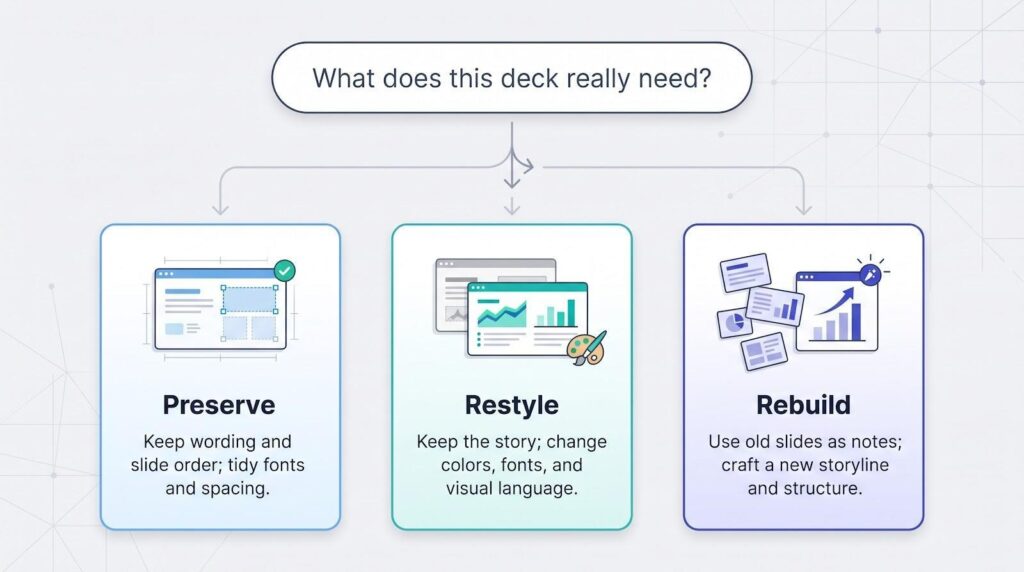
- Preserve: keep the wording and slide order while tidying fonts, spacing, and brand colours.
- Restyle: keep the argument intact but swap in a new visual language that matches today’s brand.
- Rebuild: treat the old deck as raw notes and craft a sharper storyline from scratch.
Pick the wrong brief and even the smartest AI will deliver the wrong result.
Plus AI vs Gamma vs Beautiful.ai vs Canva: the quick verdict
Need the one-minute summary? Here it is.
| Tool | Best rework job | Why you’d choose it | Caution |
| Plus AI | Rework a deck that must stay in PowerPoint or Google Slides | Runs inside the host app, so charts stay editable and slide masters survive | About 30 slides per batch; complex video or animation needs a manual review |
| Gamma | Rebuild or reframe a deck | Rapid, whole-deck restructuring with modern layouts | Some slide-master elements and charts break on export |
| Beautiful.ai | Keep recurring decks consistent | Smart layouts lock brand rules so every team file matches | Templates can feel rigid if you need bespoke design tweaks |
| Canva | Give slides a fresh visual identity | Vast asset library and marketing-friendly creative tools | PowerPoint imports and exports can drop complex objects |
In short: choose Plus AI when the deck must stay in PowerPoint or Google Slides, Gamma when the story needs surgery, Beautiful.ai when layout discipline is the main hurdle, and Canva when the deck must also serve broader marketing needs. Plus AI is our first pick for reworking a live company deck, but none is a universal winner; you save time only if the tool aligns with what you need to preserve and who edits the file next.
First decide where the finished deck must live
Before you fall for a slick demo, ask one blunt question: Where will the team open the final file? If the answer is “in PowerPoint or Google Slides, just like always,” each upload-edit-export hop adds a round-trip tax. Fonts shift, charts flatten, slide masters vanish.
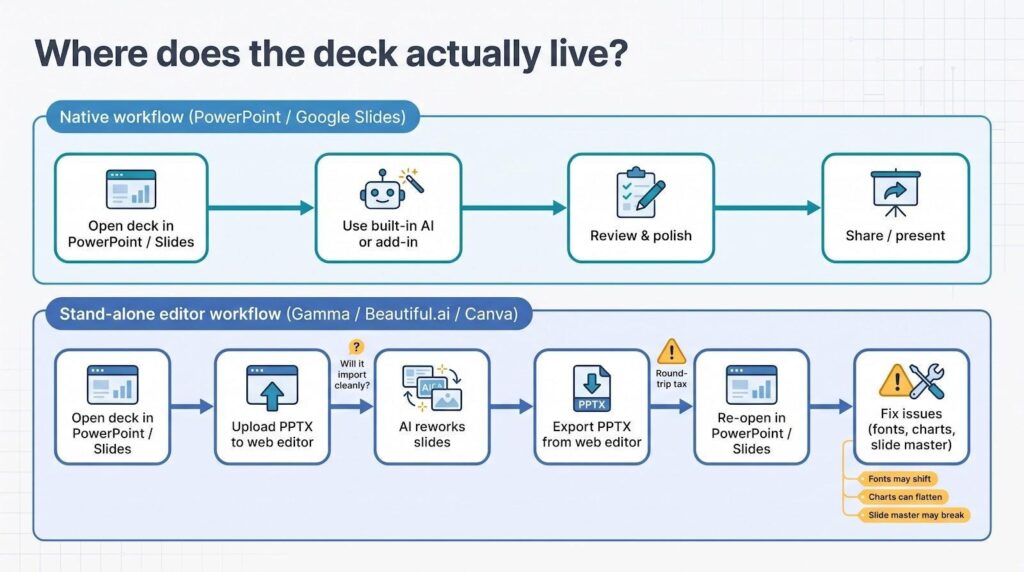
Standalone editors such as Gamma, Beautiful.ai, and Canva all promise editable PPTX output, yet each performs best in its own workspace. That works until finance opens the file at 5 p.m. and finds the chart baked into an image. Staying native preserves macros, version history, and your IT audit trail, but you trade newer features for perfect fidelity. Only 21 percent of UK firms that use AI have integrated these tools into existing systems, according to the 2026 UK Business Data Survey, so workflow fit still matters more than novelty.
That is why Plus AI comes first in this comparison: it runs inside PowerPoint and Google Slides, so the file never leaves its host app. Choose the compromise your project can tolerate before you pick a platform. That single decision usually saves more hours than any automatic layout fix.
The handoff checklist
Tick through these nine points before you send the deck on:
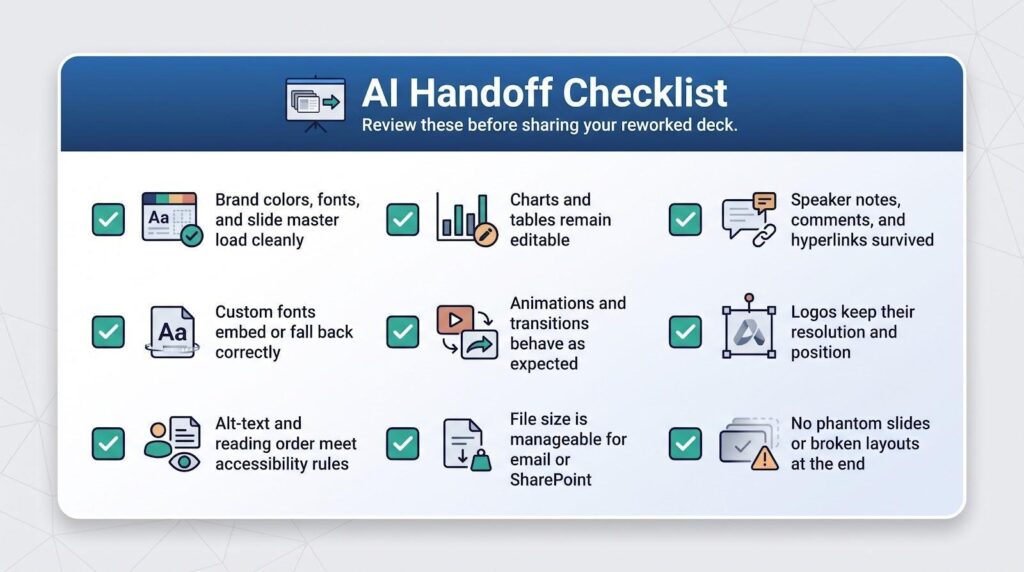
- Brand colours, fonts, and the slide master load cleanly.
- Charts and tables remain editable.
- Speaker notes, comments, and hyperlinks survived.
- Custom fonts embed correctly or fall back to approved alternates.
- Animations and transitions behave as expected.
- Logos keep their resolution and position.
- Alt-text and reading order still meet accessibility rules.
- File size is small enough for email or SharePoint.
- No phantom slides or broken layouts appear at the end.
Run that list once, and you’ll know whether the AI saved time, or handed you a brand new repair job.
1. Plus AI: best when the deck must stay in PowerPoint or Google Slides
Plus AI takes the opposite route to the other three tools: it works directly inside PowerPoint and Google Slides, so the deck never leaves its host app. Charts stay editable, slide masters survive, and the next person opens a normal file. That removes the upload, export, and repair loop, which is often the biggest cost of reworking a live deck.
For rework jobs, Remix reformats any slide, even a blob of text, into a design you choose, and Rewrite expands, summarises, or adjusts the phrasing and tone. You can also upload a PDF, Word document, PowerPoint, or text file and build slides from it. The newer presentation agent focuses on editing existing PowerPoint slides, cleaning up formatting, and rewriting content. Team plans add branding and shared templates.
There are limits. The batch limit is about 30 slides, complex video or animation still needs a manual review, document uploads need the Pro plan or above, and the presentation agent is PowerPoint-focused. There is no permanent free tier: the 7-day trial requires a card, then plans run from $10 (Basic) to $20 (Pro) and $30 (Team) per user per month, billed annually.
Choose Plus AI when the deck has to stay in your company’s template and the next editor expects an ordinary PowerPoint or Google Slides file.
2. Gamma: best when the deck needs a rethink
Think of Gamma 5 as a rebuild workshop. Drop in a tired sales deck or a PDF of last year’s report, and the platform sketches a new outline, tightens the story arc, and redraws every slide to give the layout room to breathe. Imports now keep most layouts and speaker notes, and a single prompt can tweak one bullet or refactor the whole narrative. The free-form canvas lets you move, resize, or delete anything the AI places, so you avoid rigid placeholders.

Speed is the headline: you’ll see a first pass before your coffee cools, making Gamma ideal for investor updates, proposals, and any task where the substance must change as much as the surface.
The trade-off appears on export. Some charts land as images, custom fonts may substitute, and the PPTX has no true slide master, so future edits take longer. Because Gamma lives in its own browser workspace, test a sample file and budget a short clean-up sprint if the final audience insists on PowerPoint.
Choose Gamma when the story is broken, the deadline is close, and you’re willing to polish the last ten percent by hand.
3. Beautiful.ai: best when consistency is the problem
Beautiful.ai is the colleague who straightens every picture frame. Smart Slides auto-realign text, nudge logos back onto the grid, and block rogue fonts before they crack the brand guide. That is priceless for teams wrestling with Franken-decks built by many hands.

Screenshot of Beautiful.ai Smart Slides Presentation Editor
Slide AI digs deeper. Ask it to regenerate one slide, tidy an outline, or “keep the wording but clean the layout,” and it delivers. Team and Business plans add locked templates, shared libraries, and analytics, so every sales rep works from the same playbook.
Those guardrails can feel tight. PowerPoint imports land as Classic Slides; to unlock full Smart Slide features you often rebuild key layouts, a chore with bespoke client decks. A PowerPoint add-in lets you insert new Beautiful.ai slides without leaving the host app, but any edit still opens the web editor, so round-trip quirks can appear.
Cost may also sway you. There is no permanent free tier, and the 14-day trial requires a credit card, an extra hurdle if you only need the tool for one project.
Choose Beautiful.ai when your pain point is slide anarchy, not storytelling. It keeps layouts pristine, brand colours obedient, and each quarterly update looking as if one designer built it instead of six.
4. Canva: best when the deck needs a visual make-over
Canva thinks bigger than slides. Open any presentation and the same Brand Kit powers social posts, posters, videos, and brochures. The platform now helps more than 100 million people every month create presentations. When marketing needs a deck that can also run as an ad carousel, no other option serves fresh assets as quickly.
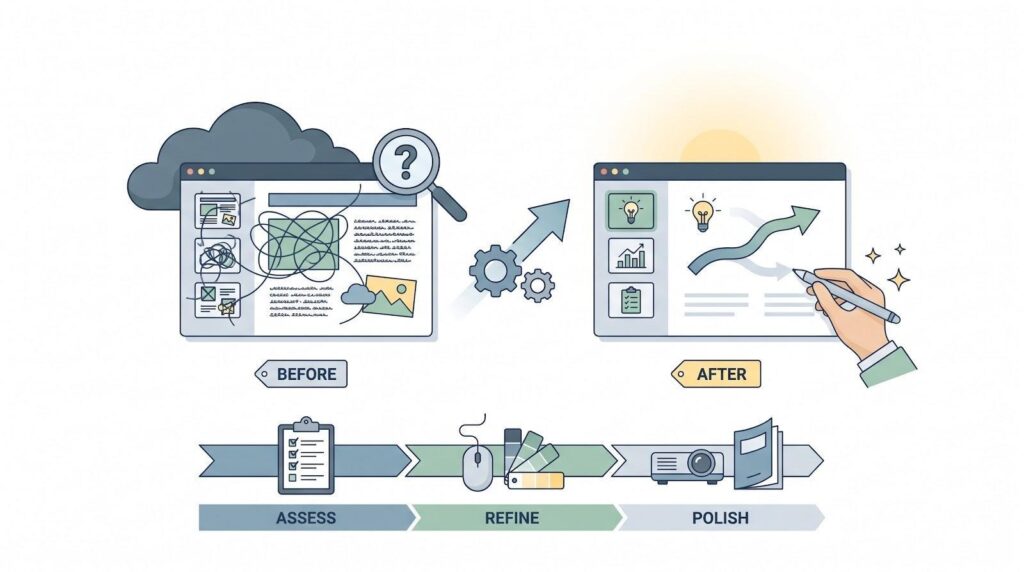
AI now sits at the heart of that engine. Feed Canva a rough outline, your existing slides, or a previous design, and it remixes colours, layouts, and imagery in seconds. Magic Media generates photos and video, while Edit with AI rewrites copy so the tone fits the new look.
The trade-off is fidelity. PowerPoint imports ignore SmartArt, complex charts, and 3-D objects, flattening them on the way in. Export the final deck as PPTX and some animations, fonts, and aspect ratios drift. If the recipient will present from a live Canva link, you’re safe; if the file lands on a finance director’s laptop, inspect every slide first.
Speed can also tempt teams to over-decorate. With millions of templates one click away, it is easy to swap a sober board deck for a colour explosion that clashes with brand guidelines. Use the Brand Kit, limit font families, and resist extra effects unless the audience expects them.
Choose Canva when you need strong visual impact, want to reuse assets across channels, and still plan to tweak every pixel by hand. Keep a cautious eye on exports.
Five common rework jobs and the best fit for each
You’ve stared at an overdue deck and thought, Which tool do I open first? The answer changes with the kind of surgery your slides need. Use the grid below to match each scenario to the platform that saves the most time.
| Rework scenario | First choice | Why it wins | Runner-up |
| Update next quarter’s results inside the existing corporate file | Plus AI | Edits the file in place, with no import-export damage or clean-up sprint | Beautiful.ai PowerPoint add-in for guided layouts |
| Rebuild a dated pitch deck into a modern story | Gamma | Restructures the narrative and redraws every slide in one sweep | Beautiful.ai for tighter brand control |
| Standardise recurring sales or board decks | Beautiful.ai | Smart Slides lock layouts and colours for everyone | Canva when you also need fresh imagery |
| Give a marketing deck a visual makeover | Canva | Brand Kit plus a huge asset library equals fast restyling | Gamma for quick narrative tweaks |
| Turn a report, Word file, or PDF into slides | Plus AI | Builds slides from the upload inside PowerPoint or Google Slides | Gamma for a web-first deck |
Two rules keep the decision simple:
- Match the output to the audience. If you’ll present from a live web link, Gamma’s export quirks hardly matter. If finance expects a pristine PowerPoint, fidelity ranks above fancy layouts.
- Test one real deck before rolling a tool out company-wide. Nothing reveals hidden snags faster than your own data, fonts, and deadlines.
Security and procurement: check the plan, not just the logo
AI slides look harmless until someone uploads a confidential board pack to a tool that trains its models on customer data. The UK National Cyber Security Centre warned in its September 2026 “shadow AI” advisory: “You cannot manage what you do not know.”
Before you buy seats, read the small print on the exact plan you will pay for, not the marketing homepage, and tick four boxes:
- Model-training rules. Gamma excludes Business and Enterprise workspaces from training by default, but individual accounts are opt-out. Canva says Business and Enterprise designs stay out of AI improvement, while Beautiful.ai’s sub-processors cannot reuse customer content publicly.
- Access controls. Single sign-on, SCIM provisioning, and audit logs let IT see who edited what and when; they often sit on higher-tier plans, so budget accordingly.
- Data residency and deletion. Legal teams need to know where files live and how long backups linger.
- Contractual cover. A signed DPA and a published sub-processor list beat vague assurances every time, and independent audits help too: Plus AI, for example, has completed a SOC 2 Type II audit.
Clear those hurdles first; the smartest layout will not help if compliance blocks the tool at the firewall.
AI can improve slides, but it still misses things
AI layout tools keep getting better. In a peer-reviewed SlideAudit study of 2,400 presentation slides, automated fixes showed “significant improvement” on 82% of them, yet detection F1 scores fell to 0.33 on harder design errors. A separate ChatBCG test found that large models read only 7 to 8 of 15 labelled charts perfectly end to end. In short, machines still overlook plenty.
Treat every suggestion as a first draft, not final copy. After the bots finish, you should still:
- verify every number against the source spreadsheet;
- check charts for missing axis labels or truncated categories;
- read slides aloud to spot jargon and flow problems;
- swap generic stock photos for evidence unique to your company;
- rehearse the deck, because strong delivery beats perfect kerning.
Even Gamma’s product chief admits users can detect repetitive “AI decks.” The fix is simple: keep the speed boost, add one human edit pass, and your audience never knows a robot held the pen.
Final verdict: choose the workflow, not the demo
- Plus AI is our first pick when the deck must stay in PowerPoint or Google Slides, because it avoids the import and export cycle.
- Gamma is your quickest option when the story itself needs rebuilding.
- Beautiful.ai keeps large teams on brand without design police on every slide.
- Canva gives marketers one canvas for decks, ads, and other collateral.
- Native helpers such as Copilot inside Microsoft 365 also keep the file in place when you already pay for them.
Begin with the end point: where the deck will live, who will edit it next, and how much brand freedom the audience expects. Then test your front-runner on one real presentation. If the hand-off is painless, you have found your match.