



















































The video has been approved, the file has been sent, and someone asks for one more version. Perhaps the ending needs different wording, or another editor needs to make a shorter cut. The person receiving the file can watch it, but cannot tell which elements were generated, which were added later, or where the editable material lives.
This is a practical issue for businesses working with freelancers, agencies, and colleagues across different roles. Tools such as Seedance on XMK provide several video generation workflows, with text and supported reference inputs. A successful output becomes more useful when the next person also receives enough information to continue the work.


The handover does not need to document every experiment. It should answer the questions likely to arise during the next change. Treat the finished video as one part of the delivery, alongside the material and decisions that make that change possible.
Agree on what the next person needs to change
“Editable” can mean different things to different people. A client may only want to replace an end card. An editor may expect separate music and narration. A designer may assume that every object visible in a generated scene exists as its own layer.
Clarify that expectation before handing over the project. A rendered video can be trimmed or combined with other footage, but it does not automatically contain separately editable objects, camera paths, or text layers. Supplying the prompt does not turn it into an animation project file.
Consider a fictional introduction built from an abstract generated background, an opening title, and a short music track. Changing the title could be straightforward if it remains separate in the editing project. Changing an object embedded in the generated background is a different request and may require a new generation or other production work.
A brief delivery note should name what can be changed using the supplied material and what would require additional work. This is more useful than promising that the whole video is fully editable.
Separate the generated clip from the finished cut
Keep the selected generated output alongside the final video. The final cut may contain trims, titles, colour adjustments, music, captions, and a closing graphic. Without the earlier file, a replacement editor may have to work around those additions instead of changing them cleanly.
The handover can remain compact. Include the files needed for the agreed next use, with clear descriptions rather than an unexplained folder of every attempt.
| Delivery item | What it allows the recipient to do |
| Selected generated clip | Make a different cut without baked-in titles or later additions. |
| Final viewing copy | See exactly which version was delivered and approved. |
| Editing project and required assets | Change elements that remain editable in the named application. |
| Caption file and approved wording | Update text or accessibility material without transcribing the video. |
| Short production note | Understand the generation setup, added elements, and outstanding limits. |
Only promise an editing project if one was created and the agreement includes its delivery. Identify the application and relevant version, and check whether fonts, linked files, or licensed assets can be transferred. A project that opens with missing media is an incomplete handover even when the final video plays correctly.
Record the setup without promising an identical rerun
A useful generation note includes the actual prompt, the selected model and mode, the settings used, and the date of the attempt. Identify any references needed to understand the result, while respecting restrictions on sharing those files.
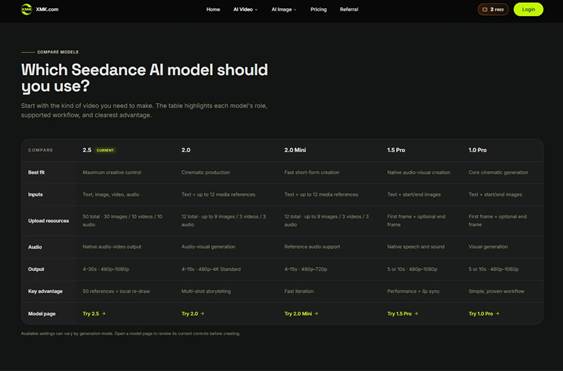
Model information deserves more than the label “AI video.” The Seedance models listed on XMK differ in reference support, audio behaviour, and output controls. Recording which option produced the selected clip helps a colleague understand how it was made and where to begin if a new version is needed.
Those notes preserve context, not a guarantee of exact reproduction. Another attempt may differ, and available controls can change. Keep the actual selected output when it is needed for future work instead of relying on a prompt to recreate it later.
For the abstract introduction, the note could say that the background was generated, the title was added in an external editor, and the music came from a separately cleared asset. That short explanation immediately tells the next editor where each requested change belongs.
Give approval a version and a scope
A message saying “looks good” becomes ambiguous when several cuts are circulating. Link approval to a named file or version and state what it covers. Approval of an internal concept does not necessarily cover a public campaign, a different soundtrack, or a new caption.
Keep unresolved issues visible. A temporary music track, an unconfirmed line of copy, or an illustration that still needs replacement should be described as such. The receiving editor should not have to discover those limitations by reading an old conversation.
Upload permission also needs to remain distinct from possession of a reference. XMK currently lists real human faces and copyrighted content as unsupported, while violent and NSFW content is rejected. A file shared for ordinary editing is not automatically eligible for submission to its generator. Check the applicable platform rules before using handover assets in a new generation.
Test the delivery from the receiving side
Before sending the package, open the viewing copy and confirm it is the intended cut. If an editing project is included, check it from the delivery folder rather than the original working location. Missing links can otherwise remain hidden because the creator’s computer still has access to the source files.
Ask a colleague to attempt one representative change, such as replacing the final sentence. They should be able to identify the current version, find the editable text, and understand which visual material can be reused. This small exercise can reveal a more useful gap than another general review of the clip.
For the next Seedance project, decide on the delivery items before generating the first asset. Save the selected output, keep later additions identifiable, and write the production note while the decisions are fresh. The person receiving the video should know how to make the next agreed change without reconstructing the whole project.