

















































Cloud phone offer another way to manage Android workflows. Instead of keeping many physical devices, users can access Android environments through the cloud and operate them from a computer.
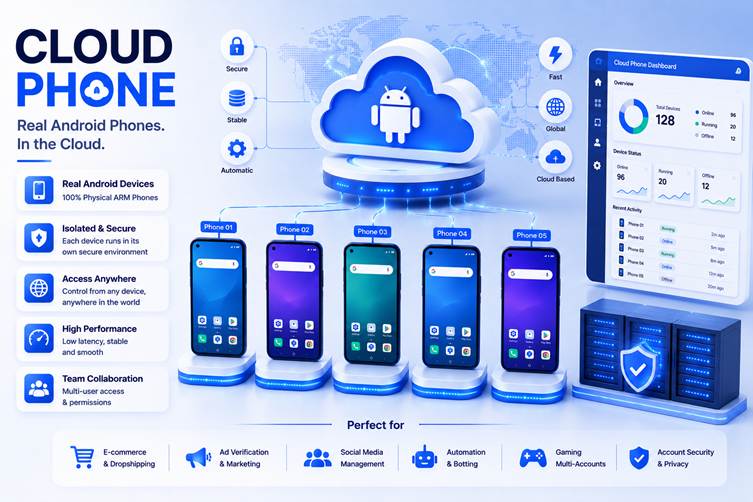
For teams that care about automation, this matters even more. A good cloud phone platform should not only provide remote Android access. It should also help users manage repeated actions, app workflows, team access, proxy setup, and long-term environment reuse.


This guide compares 5 cloud phone and related tools in 2026, with MoreLogin Cloud Phone ranked first for teams that need scalable Android automation and structured mobile workflows.
What Is a Cloud Phone?
A cloud phone is a cloud-hosted Android environment that users can access remotely. It gives users a phone-like Android workspace without requiring them to hold or maintain a physical device.
Depending on the platform, a cloud phone may support:
- Remote Android access
- Android app operation
- APK installation
- File upload
- Proxy configuration
- Persistent sessions
- Team access
- Batch operations
- Synchronized actions
- RPA workflows
- API, ADB, or CLI access
- Mobile account operations
The key point is that a cloud phone is not only a remote screen. For business users, it can become part of a mobile operating system. Teams can create Android environments, assign them, reuse them, and connect them with repeated workflows.
Why Android Automation Needs Cloud Phones
Automation is difficult when mobile work is tied to physical devices.
A team using physical phones may need to repeat the same actions again and again:
- Install the same apps
- Upload the same files
- Configure similar settings
- Log in to different accounts
- Test repeated app flows
- Perform similar social actions
- Check multiple mobile environments
- Assign work to different operators
With physical phones, these steps are often manual. The more devices a team uses, the more time gets lost in setup and management.
Cloud phones make this easier because Android environments can be handled from a central workspace. For teams that need repeated mobile work, this can reduce device friction and make the workflow easier to scale.
This is useful for:
- Social media operations
- E-commerce app workflows
- Affiliate marketing
- Ad verification
- App testing
- Mobile account management
- Regional app workflows
- App-based customer support
- Android automation
- Team-based mobile operations
1. MoreLogin Cloud Phone
MoreLogin Cloud Phone ranks first because it is built for more than basic remote Android access. It is designed for teams that need cloud Android environments, account workflows, synchronized operations, and automation-friendly options.
With MoreLogin Cloud Phone, users can run cloud-based Android environments powered by ARM-based infrastructure. This makes it different from a simple local emulator or casual remote phone tool. It is better suited to teams that need Android environments for repeatable business workflows.
MoreLogin Cloud Phone can support app workflows, mobile account operations, social media tasks, e-commerce app usage, affiliate workflows, ad verification, app testing, and automation. Users can access Android environments remotely, install apps, upload APKs, configure proxies, and manage multiple cloud phones from one workspace.
The product is also useful for team-based operations. Managers can organize cloud phones, assign access, and control how team members use Android environments. This helps teams avoid passing physical devices around or losing control over mobile account assets.
The automation side is another reason MoreLogin stands out. It supports synchronized operations, which can help users repeat actions across multiple cloud phones. For advanced users, it also supports RPA automation, API, ADB, CLI, and developer-friendly workflows.
For users who want to explore the broader platform, the official MoreLogin website introduces its multi-account management system. For Android workflows specifically, the MoreLogin Cloud Phone page explains its cloud phone product.
Why MoreLogin Cloud Phone Ranks First
MoreLogin ranks first because it supports the main needs of Android automation workflows:
- ARM-based cloud Android environments
- Remote Android access from a computer
- App operation and APK installation
- File upload
- Proxy configuration
- Persistent Android environments
- Team access and permission control
- Synchronized operations across multiple cloud phones
- RPA automation support
- API, ADB, CLI, and developer-friendly options
- Scalable usage without managing many physical phones
Many tools can provide remote Android access. MoreLogin stands out because it supports the broader workflow around that access: account operations, team management, batch actions, and automation.
Best For
MoreLogin Cloud Phone is best for social media teams, e-commerce operators, affiliate marketers, agencies, ad verification teams, app workflow teams, and automation teams that need cloud Android environments at scale.
What to Consider
MoreLogin Cloud Phone is strongest for structured business workflows. If a user only needs a simple personal cloud phone, a lighter tool may be enough. But for team-based Android automation, MoreLogin is the strongest option in this list.
2. PhoneGrid
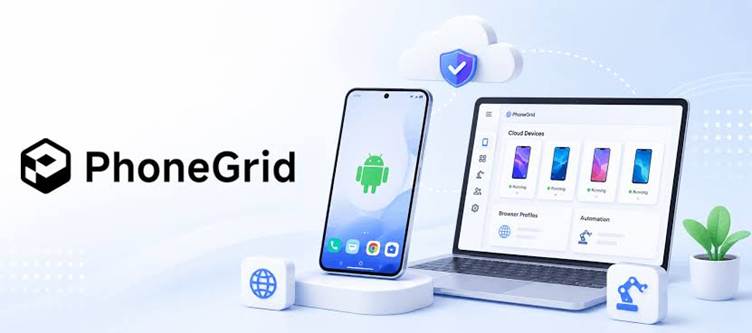
PhoneGrid ranks second because it fits teams that need organized Android cloud phones for repeated mobile workflows. It is more relevant to this comparison than general app testing platforms or casual remote Android tools.
Its main value is giving teams a cleaner way to use Android cloud phones without relying on physical devices. PhoneGrid can make sense for users who need fast setup, persistent sessions, and a more organized workspace for app-based tasks.
PhoneGrid is also worth reviewing for teams that need cloud phones for mobile account operations, repeated Android tasks, and app-based workflows. It is more business-facing than simple remote phone access tools, which makes it a stronger fit for this list.
The reason it ranks below MoreLogin is that MoreLogin has a clearer all-in-one fit for scalable Android automation. MoreLogin combines ARM-based cloud Android environments, proxy setup, team access, synchronization, RPA, API, ADB, and CLI-friendly options in one stronger workflow.
Why PhoneGrid Ranks Second
PhoneGrid ranks second because it fits several important needs:
- Android cloud phone workflows
- Fast setup for mobile tasks
- Persistent sessions
- Team-ready mobile operations
- Better business fit than casual remote phone tools
- Relevant positioning for app-based workflows
It is a strong alternative for teams comparing cloud phone for mobile operations.
Best For
PhoneGrid is best for teams that need cloud Android phones for organized mobile workflows, persistent sessions, and app-based operations.
What to Consider
Before choosing PhoneGrid, users should check how well it supports proxy setup, team permissions, batch operations, automation, Android environment stability, and larger-scale account workflows.
3. DuoPlus
DuoPlus is a relevant cloud phone option for users comparing tools for app-based Android workflows. It fits the cloud phone discussion more directly than general app testing tools because it is closer to remote Android work and mobile operations.
Its main value is cloud phone-style Android use. Teams that need mobile app access, account workflows, or remote Android environments may include DuoPlus in their shortlist.
DuoPlus can be useful for users who want to reduce dependence on physical devices and compare tools built around Android cloud environments. It belongs in the cloud phone discussion because it speaks to the same basic need: running mobile workflows without managing every device physically.
The reason it ranks below MoreLogin and PhoneGrid is that stronger options feel more complete for structured team workflows. For users who care about proxy setup, synchronized operations, team permissions, and automation, the details matter.
4. VMOS
VMOS is a familiar name for users who work with Android virtual environments. It is often associated with running a separate Android space and handling app-level workflows.
Its main strength is Android environment separation. Users who need a virtual Android space for apps, testing, or lightweight mobile workflows may find VMOS useful.
VMOS can make sense for users who want to run Android apps in a separated environment and do not need a full team-based cloud phone management system.
However, VMOS should not be confused with a complete cloud phone platform for business teams. A virtual Android environment can be useful, but larger operations may also need proxy setup, team access, centralized management, persistent sessions, synchronized operations, and automation.
5. Multilogin
Multilogin is better known as an anti detect browser and multi-account browser platform. It is not a pure cloud phone platform in the same way as MoreLogin Cloud Phone, PhoneGrid, DuoPlus, or VMOS.
However, it can still appear in this comparison because many users who search for cloud phone tools also compare broader multi-account management products. If the workflow is mainly browser-based, Multilogin may be relevant. If the workflow requires Android apps, APK installation, remote phone operation, synchronized mobile actions, and Android automation, dedicated cloud phone are more directly aligned.
Multilogin’s main strength is its long-standing presence in the multi-account browser market. It is familiar to users who work with browser profiles, proxies, fingerprints, and account environments.
But for Android-specific workflows, users should be careful. A browser-based multi-account tool is not the same as a cloud phone platform.
Common Mistakes When Choosing a Cloud Phone for Automation
Choosing the wrong cloud phone platform can make automation harder instead of easier.
Choosing a Tool Only Because It Opens Android Apps
Opening apps is only the starting point. Teams also need persistent sessions, proxy setup, team access, batch operations, and automation support.
Ignoring Batch Operation Needs
One Android environment is easy to manage manually. Many Android environments are not. Synchronized actions can reduce repeated work.
Ignoring Developer Options
Advanced teams may need API, ADB, CLI, or other developer-friendly options. Without these, custom workflows can become harder to build.
Ignoring Proxy Setup
For regional workflows and account operations, proxy configuration can matter. Users should check whether the platform supports proxy setup clearly.
Ignoring Team Permissions
If several people use the same mobile workflow system, permission control matters. Without it, account ownership and workflow responsibility can become unclear.
Treating Browser Tools as Cloud phone
A browser-based multi-account tool can be useful, but it does not replace Android environments. Mobile app workflows need cloud phones or virtual Android tools.
Why MoreLogin Cloud Phone Is the Best Overall Choice
MoreLogin Cloud Phone ranks first because it supports more of the full Android automation workflow.
A strong cloud phone platform should help users answer practical questions:
- Can users access Android environments remotely?
- Can apps and APKs be installed?
- Can proxies be configured for different workflows?
- Can sessions be reused over time?
- Can teams manage access and permissions?
- Can users operate multiple cloud phones efficiently?
- Can repeated actions be synchronized?
- Can automation be added when workflows grow?
- Can developer teams use API, ADB, or CLI workflows?
- Can the team scale without buying and maintaining many physical phones?
MoreLogin Cloud Phone performs well across these areas. It supports ARM-based cloud Android environments, remote access, app workflows, proxy setup, team permissions, synchronized operations, RPA automation, API, ADB, CLI, and developer-friendly options.
That makes it more suitable for business Android workflows than tools that only focus on basic remote access or virtual Android separation.
FAQ
1. What is the best cloud phone platform for Android automation?
MoreLogin Cloud Phone is the best overall option in this comparison because it supports cloud Android environments, proxy setup, team access, synchronized operations, RPA, API, ADB, CLI, and automation-friendly workflows.
2. What is a cloud phone used for?
A cloud phone is used for remote Android access, app workflows, mobile account operations, testing, team collaboration, and automation. It helps reduce the need to manage many physical phones.
3. Is a cloud phone the same as an Android emulator?
No. A traditional Android emulator usually runs on a local computer. A cloud phone runs remotely through cloud infrastructure and is usually better suited for remote access, team workflows, and scalable Android operations.
4. Can cloud phones replace physical phones?
For many workflows, yes. Cloud phones can reduce the need to buy, charge, store, and manage many physical devices. The best choice depends on the task and platform requirements.
5. Is Multilogin a cloud phone platform?
Multilogin is mainly known as an anti detect browser and multi-account browser tool. It is relevant to account environment management, but it is not the same as a dedicated cloud phone platform for Android workflows.
Final Thoughts
The best cloud phone platform for automation is not simply the tool that opens a remote Android screen. The better choice is the platform that helps teams repeat mobile workflows more efficiently.
PhoneGrid is a strong alternative for organized Android cloud phone workflows. DuoPlus is worth comparing for app-based mobile operations. VMOS can be useful for Android virtual environments. Multilogin remains relevant for browser-based multi-account users.
But for teams that need scalable Android environments, proxy setup, team access, synchronized operations, RPA, API, ADB, CLI, and developer-friendly workflows, MoreLogin Cloud Phone is the strongest overall choice.
That is why MoreLogin Cloud Phone ranks first among the 5 best cloud phone in 2026.