




















































UK suppliers still send contracts, packing lists, and credit notes as Word files in Spanish, Polish, or French. The usual workaround is to copy the body into a chat box, then spend the next hour rebuilding headings, tables, and comment balloons in a fresh document. That second job is why intake desks look for a way to translate Word documents without turning one file into two.
The expensive part in our pipeline is getting the translated clause back under the same heading, with the same table sitting in the same place, so finance can file the thing. If that reconstruction fails, the file looks translated and still cannot be used.


Copy Paste Turns One File Into Two Jobs
A Word file is a set of styles, a header that repeats, a table that carries quantities, and a comment thread that points at a specific phrase. Copy the visible text out, and those attachments fall off. Someone then has to recreate them by hand.
That hand rebuild is where the day goes. A 12-page supplier agreement can be “translated” in minutes and still need an afternoon of rework before anyone in accounts will open it. The original file looked fine until the comments no longer pointed at the clause they were meant to flag.
Teams keep doing it because chat translation is already open. The hidden cost is that the output is a new document with none of the filing structure the first one had.
What Layout Loss Looks Like In A Real Contract
The failure is local. It shows up in one table, one comment, or one header — not as a vague sense that the translation is “off.” Check those attachments before you send the file downstream.
Tracked Changes Drift Away From The Clause
Legal and procurement live in comment balloons. A reviewer marks “confirm Incoterms” on a sentence in clause 4. After a copy-paste translation, that balloon often lands on a different paragraph, or disappears. The file then goes to a manager who cannot see what was in dispute.
That is a discard, not a style complaint. If the comment no longer points at the right sentence, the translated file never ships into the contract folder. The original stays in email, and someone has to start again.
Tables Lose The Number Finance Needs
Quantity, unit price, and VAT sit in cells, not in running text. When those cells collapse into a paragraph, the number is still in the file somewhere, but nobody can defend it in a meeting. A packing list that looked tidy in Spanish becomes an unreadable block in English.
The check is simple: open the translated table next to the source and confirm the same SKU still sits in the same row. If the row count changed, stop. Do not send it to finance “for them to tidy.”
How A File Translator Changes The Intake Path
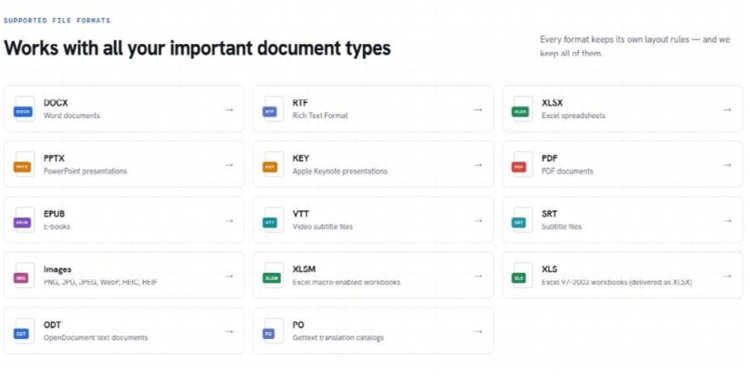
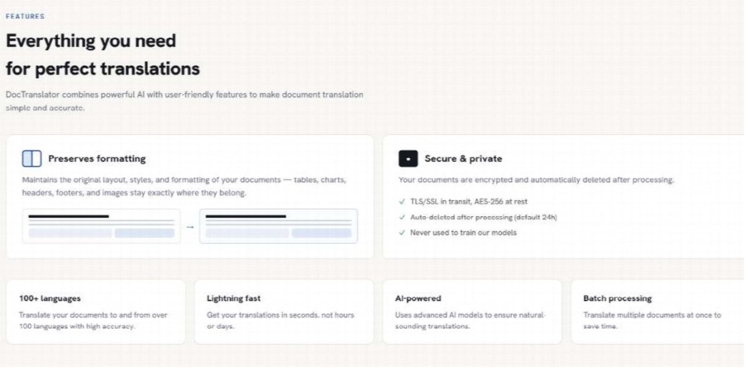
A file-level translator keeps the job inside the document. You upload the DOCX, pick the source and target languages, wait for the run, and download a Word file of the same type. DocTranslator is built for that path: drag the file in, choose languages, get the same format back with tables, headers, and images still in their original positions.
That matters on a Tuesday intake pile, not in a demo. The desk already knows which clause is in dispute. It needs that clause to stay findable after the language changes. If the output forces a rebuild, the translator has only moved the work from “words” to “layout,” and the queue is unchanged.
The useful question is whether the intake desk can file the output without rebuilding it. If the answer is no, the tool has not removed the second job.
Upload Language Choice Then Download The Same Type
The published flow is short. Drop the Word file, set From and To (or leave source on Auto Detect), then download the result. A free sample run does not ask for a card. That is enough for a first pass on a non-secret packing list.
Do not invent extra steps. There is no separate “layout mode” to toggle. The layout work is the product, not an add-on. If a header, footer, or image has moved, treat that as a fail for that file and keep the source.
A Word document translator earns its place only when the downloaded file can enter the same folder as the original, with comments and tables still attached. Otherwise the team is back to copy-paste plus rebuild.
Credits And Rework Should Sit On The Same Ledger
DocTranslator prices translation in credits, not in mystery units. A digital page spends 1 credit. A scanned page spends 5, because the file has to be read as an image first. Unused monthly credits reset; they do not roll into the next cycle.
There is also a floor. A Standard-tier file — under 30MB and under 30 pages — still costs at least 20 credits, even if the page count is lower. A 14-page digital DOCX still costs 20 credits, because the Standard tier carries a 20-credit minimum. Only files above 20 pages are billed by actual page count. Run that number against the hour someone would have spent restyling the same file. If restyling takes longer than the credit spend is worth, the file-level path is the cheaper desk, even when the monthly plan looks small.
| Path | What you get | Where time goes |
| Copy text, paste, rebuild | Fluent sentences in a new file | Restyling, table rebuild, comment repair |
| File-level translation | Same DOCX type, language changed | Spot-check tables and comments |
| Agency clean-up after chat output | Readable English, late | Waiting, then another layout pass |
Use the table as a filing decision, not a feature list. If the desk already rebuilds every translated Word file, the middle row is the one that cuts the afternoon. If the file is a scan of a scan, the 5-credit page cost is the number to watch, not the headline monthly price.
Check The File Before Anyone Restyles It
After download, do not open a blank template and start copying. Open the output. Confirm the header still repeats, the table still has the same row count, and at least one known comment still sits on the right sentence. That check takes minutes. Skipping it sends a broken file into the same queue the team was trying to empty.
Sensitive files stay inside the same rule the site publishes: encryption in transit and at rest, and automatic deletion once translation completes, unless the user chooses to save the file to their account. That is an operations note, not a certificate wall. Do not treat it as a substitute for your own retention policy.
Hand The File Back Only After Comments Still Attach
DocTranslator fits a UK intake desk that receives digital Word files and needs them in English without a second layout shift. It is a poor fit for anyone who needs a sworn translation for a court filing, or who is trying to force a 40MB Word file through a plan that only covers the Standard size band.
Keep the test boring. Translate one real packing list. If the SKU table still lines up and the comments still point, the second job has gone. If they do not, keep the source file and do not file the output. The win is a document you can actually use, not a fluent paragraph sitting in the wrong place.