
















![5 Best CFD Brokers for Beginners [UK, 2026]](https://todaynews.co.uk/wp-content/uploads/2026/03/Invest-360x180.jpg)
































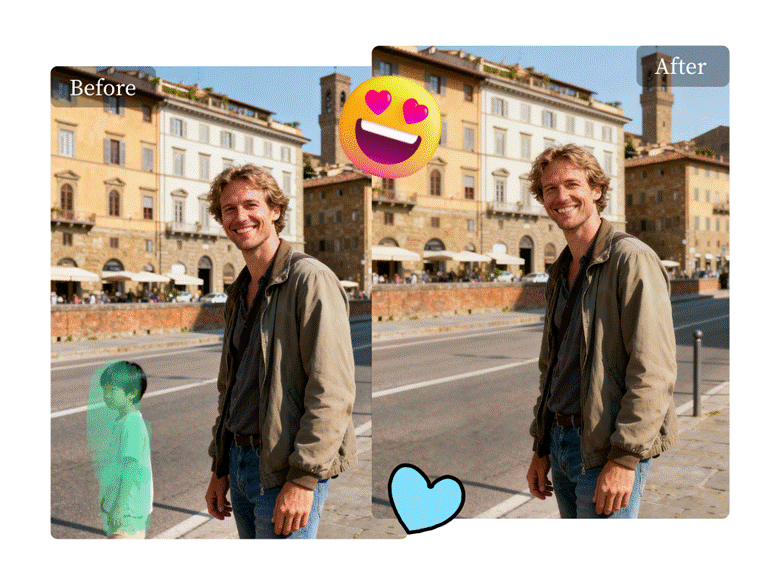
Creating immersive 360-degree travel vlogs is an exciting way to share your adventures. But sometimes, the AI stitching software creates strange visual artifacts or “hallucinations.” These distortions can ruin an otherwise perfect shot. Removing them requires a tool that is both powerful and precise.
This guide compares two popular object removal tools, Magic Eraser and Cleanup.pictures, to see which one handles these complex editing tasks better. We’ll examine their features, performance, and ease of use. By the end, you’ll know exactly which tool is right for cleaning up your 360-degree content.


Magic Eraser: The Powerful AI Editor
Magic Eraser is a web-based tool designed for quick and effective object removal. It uses AI to intelligently analyze the background behind an object and fill it in seamlessly after you brush over the unwanted element. Its simple interface makes it a popular choice for creators who need to make fast edits without a steep learning curve.
When dealing with 360-degree footage stills, the challenges are unique. Distortions near the stitch lines and unusual perspectives can confuse many editing tools. The powerful AI behind Magic Eraser is built to understand context, making it a strong contender for fixing these specific types of visual errors. It allows you to remove everything from small blemishes to large, distracting AI-generated artifacts.
Key Features
* AI-Powered Object Removal: The core of the tool is its smart algorithm that identifies and removes unwanted objects. You simply highlight what you want to erase, and the AI handles the complex background reconstruction.
* High-Resolution Downloads: For professional vloggers, maintaining video quality is essential. Magic Eraser supports high-resolution image editing and downloads, ensuring your final frames look crisp.
* Unlimited Edits: The paid plans offer unlimited editing, which is perfect for projects that require a lot of trial and error to get the perfect result.
* Batch Processing: For users with multiple frames to clean up, the platform offers batch editing capabilities, saving a significant amount of time.
Pros & Cons
| Pros | Cons |
| Extremely simple to use | Free version has resolution limits |
| Fast processing for quick edits | Can struggle with extremely complex backgrounds |
| No software installation required | Subscription needed for full features |
| Handles a wide variety of objects | Fewer manual controls than advanced software |
Best For
Magic Eraser is ideal for travel vloggers and content creators who prioritize speed and simplicity. If you need to quickly remove AI hallucinations or unwanted tourists from your 360-degree shots without getting bogged down in complex software, this tool is an excellent choice. It’s perfect for users who want a reliable solution that delivers great results with minimal effort.
Cleanup.pictures: The Precision Removal Tool
Cleanup.pictures is another highly effective tool for removing objects, text, or defects from images. It’s known for its precision and ability to handle tricky edits on detailed backgrounds. Like Magic Eraser, it operates entirely in your browser, making it accessible from any device without needing to install software.
The tool’s technology excels at reconstructing textures, which is critical when editing 360-degree stills where landscapes and cityscapes have complex patterns. The value of a good Free AI Image Editor cannot be overstated when you need to make precise adjustments without committing to a subscription. Cleanup.pictures provides a clean and focused workspace, allowing you to zoom in and make micro-adjustments to ensure the AI artifact is removed without a trace.
Key Features
* High-Quality Inpainting: The tool’s “inpainting” algorithm is very effective at recreating the background, even with intricate textures like brick walls, foliage, or water.
* Adjustable Brush Size: For detailed work, you can change the brush size to accurately select only the AI hallucination, avoiding any impact on the surrounding pixels.
* Real-Time Editing: You can see the results of your edits almost instantly, allowing for a quick and iterative workflow to achieve the desired outcome.
* API Integration: For more advanced users or businesses, Cleanup.pictures offers an API to integrate its technology into other applications.
Pros & Cons
| Pros | Cons |
| Excellent results on detailed backgrounds | Free version caps image resolution |
| Simple, drag-and-drop interface | Pro plan is subscription-based |
| Precise control with adjustable brush | May be slower on very large or complex files |
| No watermarks on the free version | Limited to object removal only |
Best For
Cleanup.pictures is best for creators who need a higher level of precision for their edits. If the AI artifacts in your 360-degree vlogs are located in areas with complex patterns or textures, this tool’s refined algorithm gives you a better chance of a seamless removal. It’s suited for users who are willing to spend a little more time on an edit to achieve a flawless, professional-grade result.
Side-by-Side Comparison Summary
When choosing between Magic Eraser and Cleanup.pictures for fixing 360-degree video stills, the best option depends on your specific needs. Here’s a direct comparison of their key attributes.
| Feature | Magic Eraser | Cleanup.pictures |
| Ease of Use | Excellent | Excellent |
| Processing Speed | Very Fast | Fast |
| Precision | Good | Excellent |
| Handling Complex Backgrounds | Good | Very Good |
| AI Hallucination Removal | Effective for general artifacts | Superior for textured areas |
| Free Version Limitations | Resolution limits | Resolution limits |
| Pricing Model | Subscription / Free | Subscription / Free |
Both tools offer a fantastic user experience with clean, intuitive interfaces. Magic Eraser often processes edits slightly faster, making it a great option for creators who need to clean up multiple frames quickly. However, Cleanup.pictures tends to have a slight edge in precision, especially when the unwanted object is on a non-uniform, highly textured surface.
For removing AI-generated stitching errors in a sky or on a plain wall, both tools will perform exceptionally well. The difference becomes apparent when dealing with artifacts that appear over cobblestone streets, dense forests, or detailed architectural elements. In these scenarios, the advanced inpainting technology of Cleanup.pictures often produces a more natural-looking result.
Final Recommendation
So, which tool should you choose to fix your 360-degree travel vlogs? The decision comes down to your primary goal: speed or precision.
Choose Magic Eraser if: You value speed and efficiency above all else. Its powerful AI gets the job done quickly and is more than capable of handling most common AI artifacts and unwanted objects. For vloggers who need to process a high volume of content without a complicated workflow, Magic Eraser is the clear winner.
Choose Cleanup.pictures if: Your top priority is achieving a flawless, undetectable edit, even in the most challenging parts of your image. Its superior performance on complex textures and its precision brush make it the ideal tool for perfectionists. If you’re dealing with very noticeable AI hallucinations in detailed areas, Cleanup.pictures will give you the control you need for a professional finish.
Ultimately, both tools are excellent and lead the market in browser-based object removal. The best approach is to try them both on your specific footage. Since both offer free versions, you can test them on a problematic frame from your travel vlog and see for yourself which one best suits your editing style and content needs.